Design in Claude, on brand.
Encode your design system into Claude once. Then every screen, critique, review and dev handoff follows your brand — not the generic AI look.
Start from zero, or go faster.
Pick the path that sounds like you. Same pack, same skills — different starting point.
New to Claude, or building your system from scratch
For a person or a team using Claude for the first time, or setting up a design system zero to one.
- Learn what Claude is and how skills work — in plain words
- Turn screenshots or a style guide into your first design system
- Make your first on-brand screens the same day
Your team already designs in Claude
Your system already lives in Claude. You want everyday design work — screens, reviews, handoffs — to take minutes, not hours.
- Screens with every state from a three-line brief
- Critiques, flow checks and stakeholder reviews in one ask
- Dev handoff specs written for you, and one shared system for the team
AI-made UI looks the same because it doesn't know your product.
Longer prompts fix one screen. The next one drifts. The fix is to give Claude your system — once — in a form it always follows.
- Purple gradients, centred everything, lorem ipsum
- Every screen slightly different
- Re-explaining your brand in every chat
- Vague feedback, random changes
- Your tokens, components and voice every time
- Empty, loading and error states by default
- Fix a rule once; every future screen gets it
- Critiques with exact values, specs devs trust
Six skills. Your product. Every step.
Install them in Claude once. Then just ask. Each one is a single message.
Brand-to-Skill
Your own design-system skill — tokens, component recipes, voice and rules — plus a specimen page to check it.
Screen Builder
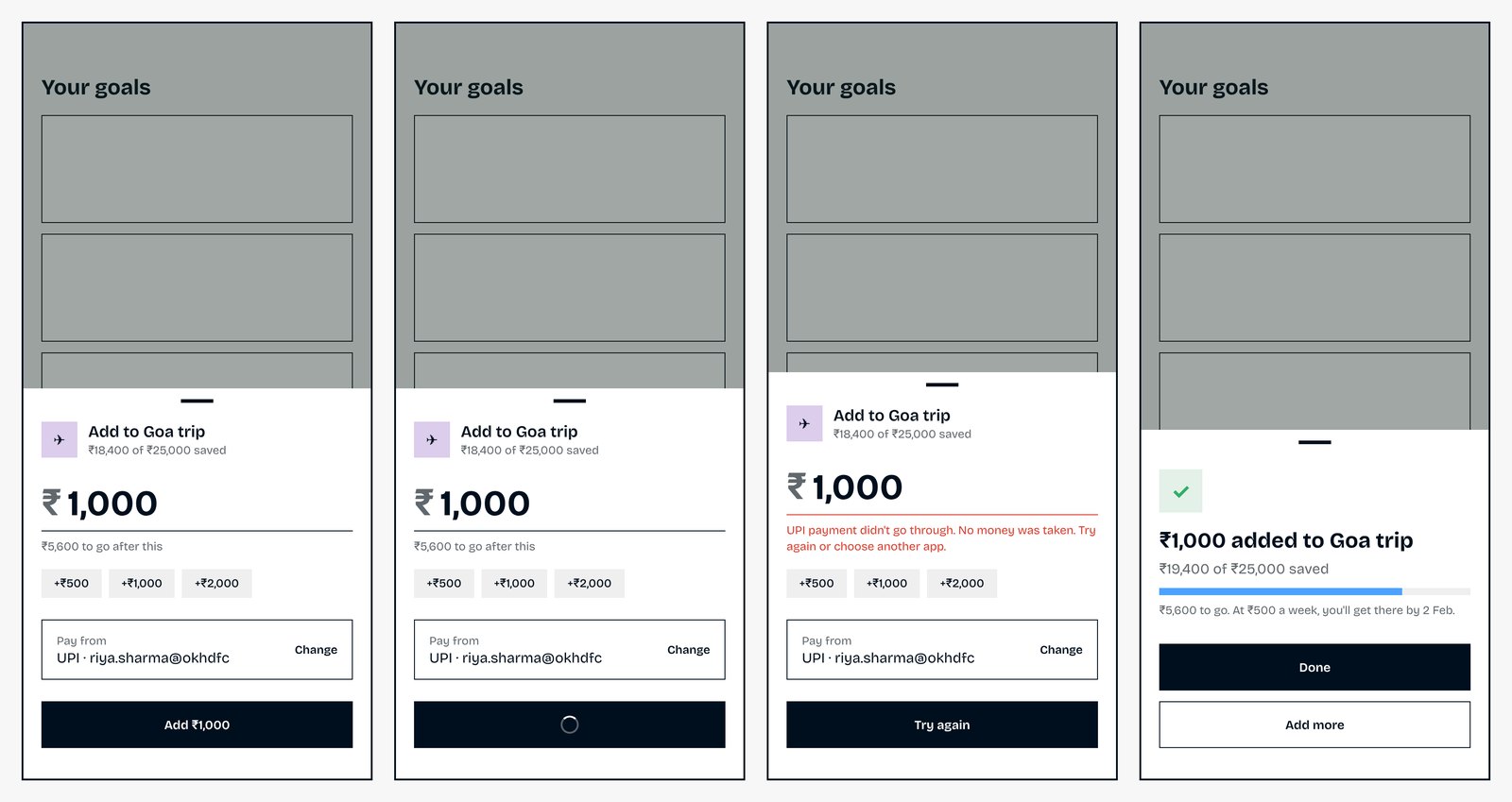
An on-brand screen with every state: default, empty, loading, error and success, in one file.
Design Critic
Prioritised P1/P2/P3 fixes with exact tokens and values — and it applies them if you want.
Flow Checker
A flow map, an inventory of inconsistencies, and the screens you forgot to design.
Review Shell
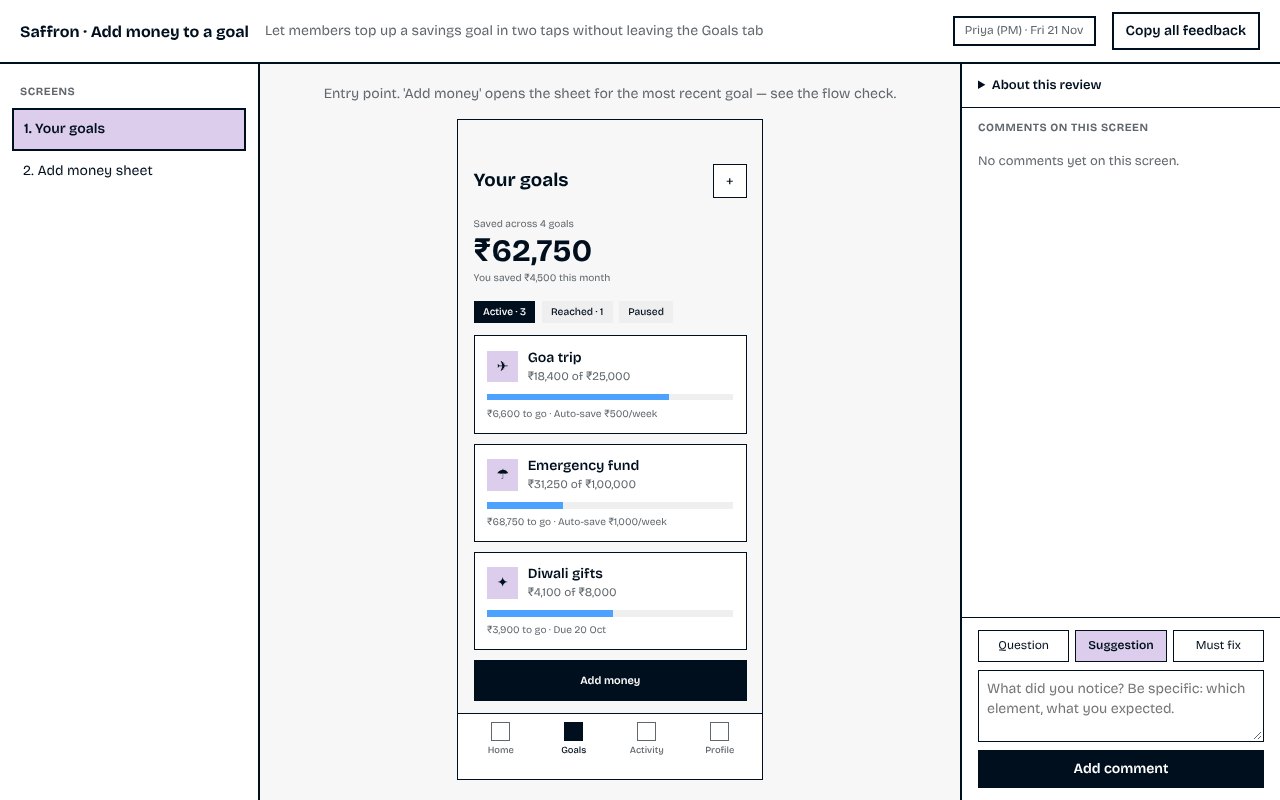
One review page with context, state tabs and typed comments that export as text.
Handoff Writer
A developer spec with states, edge cases, acceptance criteria and open questions.
Plus seven bonus skills people love.
Included free. The everyday jobs around design — done in one message.
Prototype QA
Opens every screen and state at phone, tablet and desktop sizes, clicks through, and lists exactly what broke.
Variations
Three or four truly different directions — all on your own tokens — side by side. Pick one or mix parts, then refine.
Copy Polish
Buttons, errors and empty states rewritten in your voice — before/after table and a word glossary.
Feel Pass
Press feedback, smooth state changes, sheet and toast motion — on your motion tokens, reduced-motion safe.
A11y Check
Real contrast ratios, tap targets, labels and focus order — with fixes that stay on-brand.
Cover Page
A clean cover and thumbnail for every project, so galleries and shared links look organised.
Case Study Writer
An honest portfolio or internal write-up built from your real screens, decisions and results.
DESIGN.md, the open format other AI design tools and teammates can read.See it on a real product.
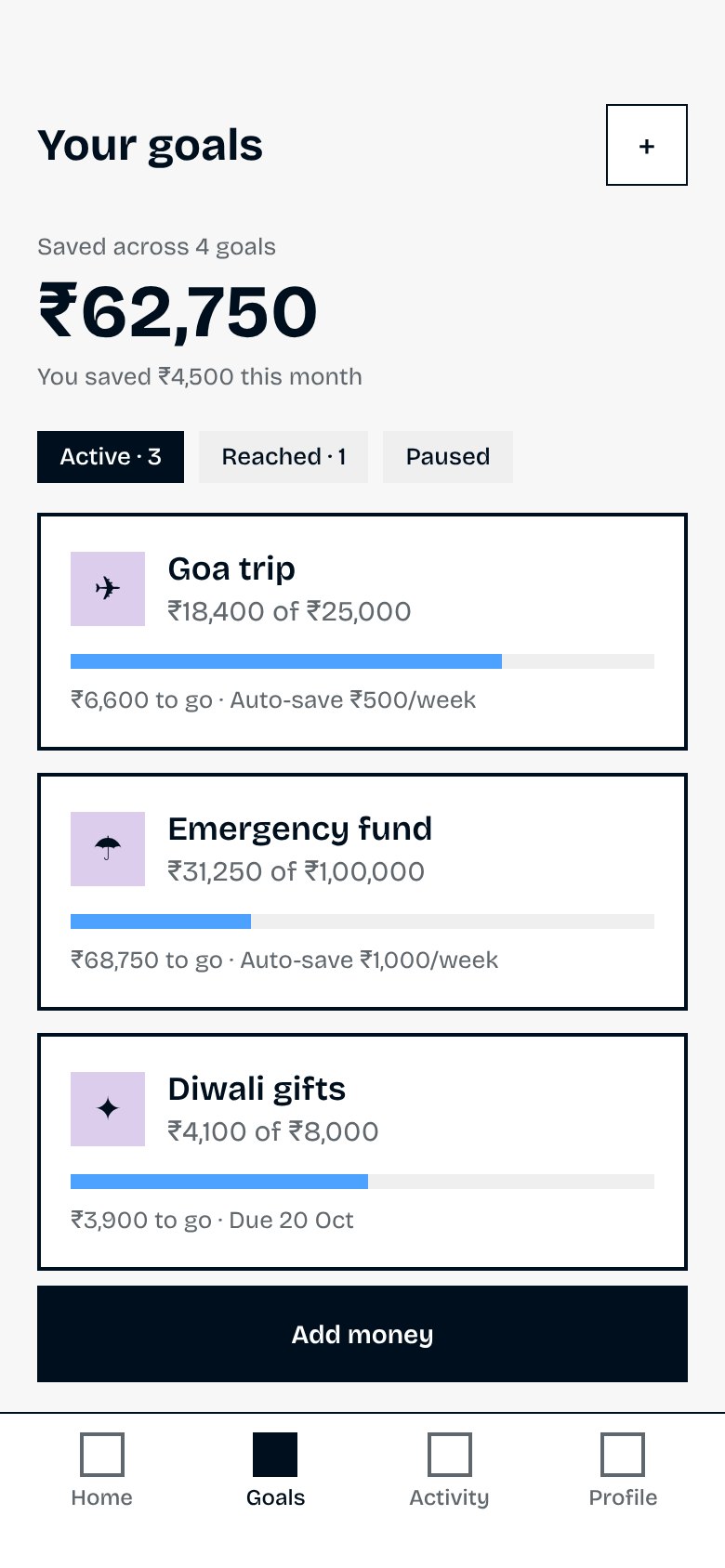
Saffron is a fictional Indian savings app used throughout the course. One request — “design the Goals tab” — and everything else came from its encoded design system.
From Level 0 to Level 100.
The path I took — from asking Claude for screens and getting generic UI, to designing every day in Claude and building my own tools and products with it. Each level is a lesson. Levels 0 and 10 are free.
What is Claude, what is design, and why AI designs all look the same
Start from zero: what Claude is, what an app designer does, your first chat, and the one idea this whole course is built on. · 25 min
Make your app's rulebook and teach it to Claude
Turn a few screenshots into a rulebook (a design-system skill) that Claude follows in every chat — every step, every message to type. · 45 min
Make your first real screens
Ask for a screen in three simple lines and get every version of it — empty, loading, error and success — in one clickable file. · 35 min
Learn to spot what's wrong with a design
See a screen like a senior designer does: find the real problems, sort them by importance, fix them exactly — and turn every fix into a rule. · 30 min
Check the whole journey and get feedback
Make sure screens fit together, find the screens everyone forgets, and run reviews where stakeholders give clear, useful feedback. · 35 min
Hand your design to engineers (and share it with your team)
Explain your design so engineers build it exactly right, check it after it's built, and get your whole team designing from one rulebook. · 35 min
Level 100: build your own design tools
Go past screens: build the skills, trackers, dashboards and plugins you and your team wish existed — and turn the best ones into products. · 40 min
One price. Everything included.
- 6 Claude skills: Brand-to-Skill, Screen Builder, Design Critic, Flow Checker, Review Shell, Handoff Writer
- 7 bonus skills: Prototype QA, Variations, Copy Polish, Feel Pass, A11y Check, Cover Page, Case Study Writer
- DESIGN.md export + start-from-references for brand-new products
- The full Level 0 → 100 course (7 lessons)
- START-HERE guide: install and your first 30 minutes
- Complete worked example (Saffron)
- Free updates as Claude changes
- 14-day refund, no questions
Secure checkout by Gumroad · Instant download
Who it's for
Starting out: anyone — designer, founder, PM or a whole team — opening Claude for the first time or building a design system zero to one.
Speeding up: teams whose system already lives in Claude and who want screens, reviews and handoffs done in a fraction of the time.
What you'll be able to do
Encode your design system in an afternoon, design screens with every state from a three-line brief, run reviews that produce exact fixes, and hand off specs developers don't need to question.
Questions
Do I need to know how to code?
No. You talk to Claude in plain language. The skills produce HTML previews you open in a browser; developers can read them, but you never have to.
Which Claude plan do I need?
Any Claude plan that supports Skills (check Claude's settings for a Skills section). The skills also work in Claude Code.
Will it work with my design system?
That's the point. Brand-to-Skill reads your style guide, tokens, CSS or just screenshots of your app and turns them into a skill. Every other skill then follows your system — not a generic one.
Does this replace Figma?
It can for a lot of work — exploring, prototyping, states, reviews and handoff. Many teams use both: design in Claude, then export what needs to live in Figma.
What's free and what's paid?
Levels 0 and 10 are free on this site — enough to encode your design system by hand. The pack adds Levels 25–100, the six skills that do every step for you on your own product, and seven bonus skills.
I don't have a design system yet. Is this for me?
Yes. Brand-to-Skill can start from references: pick 4–6 apps you love, say what you like in each, and it builds a starting system you then make your own. Levels 0 and 10 walk you through it.
What if it doesn't help?
Email within 14 days for a full refund.
Can my whole team use it?
One licence per person. For a team licence, get in touch after buying one — the price is credited.